Introduction
Security professionals know that reconnaissance is one of the most important steps in a penetration test. Finding vulnerable systems, understanding network exposure, and identifying potential attack surfaces takes time and requires using multiple tools.
What if you could automate this process while maintaining professional standards and generating reports that follow industry methodologies like PTES and OWASP?
That’s where ArgusScan comes in. It’s an open-source Python CLI tool that integrates with Shodan API to automate ethical pentest reconnaissance, making security assessments faster and more efficient.
What is ArgusScan?
ArgusScan is a professional pentest automation tool that uses Shodan API to search for vulnerable hosts and exposed services. It’s designed for security professionals who need to perform authorized security assessments quickly and generate professional reports.
The tool is built with Python 3.8+ and provides a rich command-line interface that makes it easy to search for specific services, filter results, and export data in multiple formats.
Key Characteristics:
- Professional CLI with colorful output using the Rich library
- Multiple export formats: Markdown, JSON, CSV
- Advanced filtering options
- Professional report generation following PTES/OWASP standards
- Rate limiting to respect API limits
- Integration with popular security tools
Key Features
Shodan API Integration
ArgusScan fully integrates with Shodan API, allowing you to search for vulnerable hosts using Shodan search queries (also known as “dorks”). You can search by service, port, country, organization, and many other criteria.
The tool handles API authentication, rate limiting, and error handling automatically, so you can focus on your security assessment.
Professional CLI Interface
The command-line interface uses the Rich library to provide colorful, organized output. This makes it easy to read results and understand what the tool is doing. The interface shows progress, results, and any errors clearly.
Multiple Export Formats
ArgusScan supports three export formats:
- Markdown: Perfect for documentation and reports
- JSON: Ideal for integration with other tools and automation
- CSV: Great for spreadsheet analysis and data processing
This flexibility allows you to use ArgusScan results in different workflows and integrate them with other security tools.
Advanced Filtering
You can filter Shodan results by:
- Country code (e.g.,
country:BRfor Brazil) - Port number (e.g.,
port:8080) - Organization name
- And many other Shodan search parameters
This helps you narrow down results to specific targets or regions, making your assessment more focused and efficient.
Professional Reports
ArgusScan generates reports that follow industry standards like PTES (Penetration Testing Execution Standard) and OWASP methodologies. These reports are suitable for professional pentest engagements and can be included in your final deliverables.
Rate Limiting
The tool respects Shodan API rate limits (1 request per second) automatically. This prevents API errors and ensures you stay within your plan’s limits, whether you’re using a free or paid Shodan account.
Tool Integration
ArgusScan is designed to work with popular security tools:
- Nuclei: Use results to run vulnerability scans
- OWASP ZAP: Import targets for automated security testing
- Metasploit: Use discovered services as targets for exploitation
The JSON export format makes it easy to integrate with these and other tools.
Installation and Setup
Installing ArgusScan is straightforward:
# Clone the repository
git clone https://github.com/digenaldo/argusscan.git
cd argusscan

# Install dependencies
pip install -r requirements.txt

# Run the tool
python argus_scan.py --help
You’ll need a Shodan API key, which you can get from Shodan.io. Free accounts have some limitations, but they work with ArgusScan for basic searches.
Usage Examples
Here are practical examples of how to use ArgusScan:
Search for Jenkins Instances
python argus_scan.py "jenkins port:8080" --token YOUR_API_KEY
This searches for Jenkins instances running on port 8080. Jenkins is often misconfigured and can be a security risk if exposed publicly.
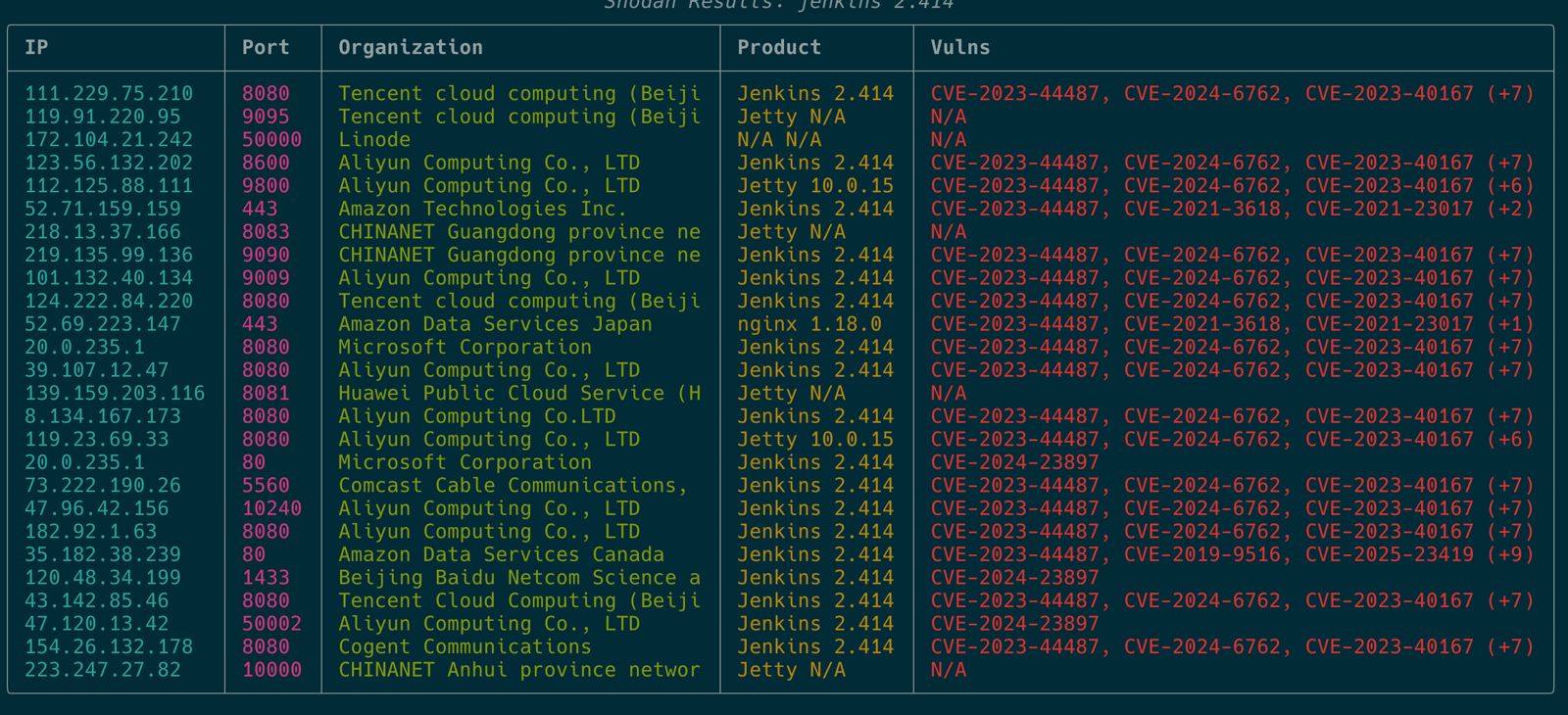
The output shows detailed information about discovered hosts, including IP addresses, ports, organizations, products, and identified vulnerabilities (CVEs). This makes it easy to identify potential targets and understand their security posture.
Search Apache Servers in Brazil
python argus_scan.py "apache country:BR" --token YOUR_API_KEY
This finds Apache web servers located in Brazil. You can use country filters to focus on specific regions.
Export Results to JSON
python argus_scan.py "jenkins" --token YOUR_API_KEY --export json
This exports results in JSON format, which you can use with other tools or scripts for further analysis.
Generate Professional Report
python argus_scan.py "apache" --token YOUR_API_KEY --export markdown --report
This generates a professional markdown report following PTES/OWASP standards, suitable for client deliverables.
Technical Excellence
ArgusScan is built with quality in mind:
Comprehensive Testing:
- 25 unit tests covering all major functionality
- 96% code coverage ensuring reliability
- Automated testing with GitHub Actions CI/CD pipeline
Code Quality:
- Pre-commit hooks for quality assurance
- Modern Python 3.8+ implementation
- Clean, maintainable code structure
Professional Development Practices:
- Version control with Git
- Issue tracking and pull request workflow
- Documentation and examples
This level of quality ensures the tool is reliable and suitable for professional use.
Integration with Pentest Workflows
ArgusScan fits naturally into professional pentest workflows:
Reconnaissance Phase: Use ArgusScan to identify exposed services and potential targets before starting detailed testing.
Tool Integration: Export results to JSON and import them into Nuclei, OWASP ZAP, or Metasploit for automated vulnerability scanning and exploitation.
Reporting: Generate professional reports that can be included in your final pentest deliverables, following PTES and OWASP standards.
Documentation: Use Markdown exports to document findings and create detailed reports for clients.
Legal and Ethical Considerations
This is extremely important: ArgusScan should only be used with proper authorization.
Mandatory Requirements:
- Written authorization (Rules of Engagement - RoE) before any scanning
- Only scan systems you own or have explicit permission to test
- Follow responsible disclosure practices
- Comply with all applicable laws and regulations
Authorized Use Cases:
- Bug bounty programs with written authorization
- Professional pentest engagements with signed RoE
- Academic security research with proper approvals
- Defensive security assessments of your own infrastructure
- Red team exercises with proper authorization
Unauthorized Use:
- Never scan systems without permission
- Never use for malicious purposes
- Never violate terms of service
- Never break laws or regulations
Security tools are powerful, and with that power comes responsibility. Always use ArgusScan ethically and legally.
Use Cases
ArgusScan is useful in several scenarios:
Authorized Bug Bounty Programs: When you have written authorization to test specific targets, ArgusScan helps you find exposed services quickly.
Professional Pentest Engagements: Use it during the reconnaissance phase to identify potential targets and attack surfaces before detailed testing.
Academic Security Research: Researchers can use it to study internet exposure and security trends, always with proper authorization.
Defensive Security Assessments: Organizations can use it to assess their own infrastructure and identify misconfigurations or exposed services.
Red Team Exercises: Red teams can use it to find targets within authorized scope during exercises.
Future Roadmap
The project is actively maintained, and future enhancements may include:
- Support for additional export formats
- Integration with more security tools
- Enhanced filtering options
- Web interface for easier use
- Additional report templates
- Performance improvements
Contributions and feedback are welcome on the GitHub repository.
Conclusion
ArgusScan is a powerful tool for ethical security professionals who need to automate reconnaissance during authorized pentest engagements. With its professional CLI, multiple export formats, and high code quality, it’s designed to make security assessments more efficient while maintaining professional standards.
The tool demonstrates that open-source security tools can be both powerful and well-built, with comprehensive testing and professional development practices.
Key Takeaways:
- Automates Shodan searches for pentest reconnaissance
- Professional reports following PTES/OWASP standards
- 96% test coverage and CI/CD pipeline
- Integrates with popular security tools
- Always use with proper authorization
If you’re a security professional looking to improve your pentest workflow, consider trying ArgusScan. Star the repository on GitHub, try it out (with proper authorization), and contribute improvements if you find it useful.
Remember: Security tools are powerful, but they must be used responsibly and ethically. Always get written authorization before scanning any systems.
Get Started:
- GitHub Repository: https://github.com/digenaldo/argusscan
- Read the documentation
- Try it with your Shodan API key
- Contribute and share feedback
Use responsibly, and happy ethical hacking!